

BODY OF JAVASCRIPT
In metaphorical terms, Javascript is like a body of ocean; with functions being the vessels floated above the surface. The ocean body can provide values to nourish the needs of the vessels, like fish to feed the stomachs of the crew. The ocean body constantly provides value, whereas the value of the crew on each vessel can and does change.
This tutorial aims to contextualize the role and scope of variables within Javascript. In turn, the broader application of variables with Javascript conventions will be be expressed in examples. Before we do so, a basic theory of variables needs to be explained and understood.
Variables
Variables are defined differently in the script body compared to function structures.
- The scope of a variable is determined by where it was originally declared or initialized.
- A variable declared or initialized outside a function has a global scope.
- A variable declared or initialized inside a function has a local scope.
- A variable initialized inside a function but without the 'var' prefix has scope across all functions.
- A variable declared or initialized inside a function is unavailable to other functions unless its value is passed via a function parameter to another function.
This means...
- Values can never be passed from functions back to the script body.
Variables and Scope
There are basically three types of scope attributed to variables.
- local scope
- functional scope
- global scope
Javascript therefore employs a sustaining approach with global variables.
- A variable name and its value declared outside a function remains constant.
- A variable declared or initialized outside a function has scope inside functions.
- A variable declared or initialized outside a function utilized inside functions assents the processes of the function.
Javascript therefore employs a self-sustaining approach with local variables.
- A variable declared or initialized inside a function self-sustains its processes.
- A variable declared or initialized inside a function has local scope within the body of that function and its structures.
Scope rules also have these exceptions and limitations...
- A variable declared or initialized outside a function has limited scope unless passed to a function.
- A variable declared or initialized outside a function can employ operators to reassign values.
- A variable can be passed as a parameter from either an event handler, a function or the script body but not to the script body.
Variables and Values
Variables are identifiers created merely to serve as containers for values to be stored and retrieved. All variables contain values. The values they contain can be infinitely changed. Variable names however cannnot be changed.
Data Types: In Javascript there are three primary data types (String, Number, Boolean), two composite data types (Object, Array), and two special data types (Null, Undefined)..
THE BOX MODEL
A visual way to illustrate the dimensions and interactions between local and global variables and the passing of variables between functions is the box model.
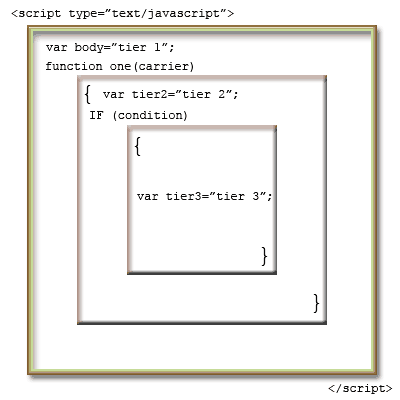
The box model demonstrates the tiers each new function or conditional places on Javascript and the interpretation of local or global scopes with each nested container. the scope a variable has in the script body can be called within functions or conditions (IF statements called either from the script body or as a structure of the function). Variables declared and initialized in the script body therefore have global scope. Any variable declared within a function or its structures has local scope within the whole function. In this example, variables declared in tier 3 would be available in tier 2 but not in the script body tier 1. While variables declared in tier 1 would be available in all tiers above tier 1.
In theory, the box model illustration shows:
- The body as the container tier
- IF statements or Functions open branches from the body tier to upper tiers
- Curly Brackets are the { beginning and end } of tier 2 nested containers
- Conditionals within functions create tier3 and above nested containers
to test how global and local variables can be used.
Comparisons to HTML
When compared to HTML, Javascript structure has many similarities. Variables for example are relatable to HTML tags.
Each one has opening and closing brackets.
HTML Example
<p id="text"> This is a text string </p>
Javascript Example
var text = "this is a text string";
- var and <p> act as opening brackets
- ; and </p> act as closing brackets
- text = and id="text" act as identifiers
- the value is contained within the opening and closing brackets
HTML and Javascript also have similar parent/orphan conventions demonstrated by the object/properties syntax.
HTML Example:
<body>
<div>
<p>Function One</p>
</div>
</body>
Javascript Example:
<script type="text/javascript">
// body of Javascript
// for global variables and function calls
function one()
{var nested="level 1";}
</script>
You can see the structures are similar
- <body> and <script> act as definition tags
- The script body is an open area for variable declaration much like <div> or <table> combinations are structured presentational containers
- <p> and function names act as nested elements within the container.
- These elements are all closed off with the same semantic order.
blog comments powered by Disqus