

TABLE LAYOUTS vs DIV LAYOUTS
Since the dawn of HTML, the sentiments echoed from generation to generation of web developer pivot around a universal question every developer invariably faces, and has to conquer for themselves, the debate being whether to use table-based or div-based structures for layouts.
In the beginning, tables became the innocuous niche for presentation. One could argue tables were a crude form of markup, able to structure a page into columns and rows and therefore break up (and if required contain) the document flow of basic block-level elements - such as paragraphs, headers, and line breaks. It is no coincidence then that pioneer developers unerringly seized tables and took to them in droves to populate the web before the existence of div containers came along.
TABLE DESIGN COMPARISONS
In order to understand the reason developers choose either table-based or div-based methods for design, one must compare. We undertook the same experimental process to determine the mechanisms of each method, to evaluate the merits and limitations of each design layout, and ultimately to gauge its influence on individual preference.
This is a table layout design
This is a divs layout design
Two examples were coded above in 4x4 box format. We used a 1:4 size ratio to simulate the 1024 x 768 pixels standard user's screen resolution. These tables should both render the same on IE and Firefox browsers. There is no discernible visual difference. In HTML however a div-based layout design is more complex, layered, laborious and cumbersome than a table-based design. These differences will be explained in detail below.
MECHANISMS OF EACH METHOD
TABLES: The ease of use with which one constructs a table for presentation is straightforward. No more than three HTML tags are required. Tables have inherited values, which makes the construction of a table much quicker.
<table>
<tr>
<td></td>
<td></td>
<td></td>
<td></td>
</tr>
<tr>
<td></td>
<td></td>
<td></td>
<td></td>
</tr>
<tr>
<td></td>
<td></td>
<td></td>
<td></td>
</tr>
<tr>
<td></td>
<td></td>
<td></td>
<td></td>
</tr>
</table>
DIVS: The ease of use with which one constructs a table for presentation is slightly more complex. The incorporation of CSS properties becomes mandatory because divs require a width to function. Class and ID attributes are also used to channel CSS values and declarations to div tags. The div tag therefore assumes the role of all table elements <table> <tr> <td> with Class and ID attributes used to channel CSS values and declarations to them.
<div id="divtable">
<div class="wrapper">
<div class="tblclear"></div>
<div class="tblsqr"></div>
<div class="tblsqr"></div>
<div class="tblsqr"></div>
</div>
<div class="wrapper">
<div class="tblclear"></div>
<div class="tblsqr"></div>
<div class="tblsqr"></div>
<div class="tblsqr"></div>
</div>
<div class="wrapper">
<div class="tblclear"></div>
<div class="tblsqr"></div>
<div class="tblsqr"></div>
<div class="tblsqr"></div>
</div>
<div class="wrapper">
<div class="tblclear"></div>
<div class="tblsqr"></div>
<div class="tblsqr"></div>
<div class="tblsqr"></div>
</div>
</div>
CSS STYLES
#divtable {min-width:272px;width:272px;height:200px;border-style:solid;border-width:1px;padding:1px;}
.tblclear {background-color:blue;border-style:solid;border-width:1px;border-color:white;width:64px;height:48px;padding-right:2px;float:left;clear:left;}
.tblsqr {background-color:red;border-style:solid;border-width:1px;border-color:white;width:64px;height:48px;padding-right:2px;float:left;}
.wrapper {clear:both;}
Divs therefore act as substitutes for table elements. In this case, the <divtable> attribute associated with the parent div substitutes the <table> element. <tblclear> and <tblsqr> substitute the <td> elements. The <wrapper> attribute substitutes the <tr> element and is mandatory to render properly on IE browsers. The absence of a <wrapper> causes the boxes to render in IE as demonstrated in the image below.
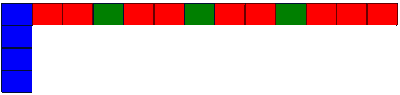
NOTE: Firefox does not require a <wrapper> div.
MERITS AND LIMITATIONS OF EACH DESIGN LAYOUT
TABLE-BASED
Advantages
- Tables are relatively straightforward
- Tables well-supported on all browser versions
- Tables rows do not wrap on screen resize
- Tables maintain integrity
- Tables keep their document flow
Limitations
- Table structures are fixed
- Tables divisions limited to blocks
- Tables used for layouts are not semantic
- Less Accessibile
- Decreased functionality
DIV-BASED
Advantages
- Fluid structures allows the designer to tweak the position of each container individually
Limitations
- Chance for rendering errors increase due to the complex cross-browser semantic interpretations
- Lots of quirks and cross-browser bugs
- Divs wrap on screen resize
- Using floats to line up divs take elements out of the document flow
- The combination of CSS properties and dependence on CSS
blog comments powered by Disqus